
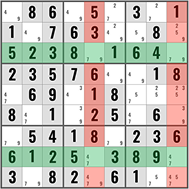
The Two-String Kite is an advanced single-digit Sudoku technique that uses two strong links — one in a row and one in a column — connected through a shared box. It’s part of the Turbot Fish family alongside the Skyscraper and is one of the most effective pattern-based techniques for Expert and Evil puzzles.
Prerequisites
Before learning the Two-String Kite, you should be comfortable with:
- Candidate notation (pencil marks) — complete candidates in every empty cell
- Naked singles and hidden singles — foundational solving
- Naked pairs and hidden pairs — subset elimination
- X-Wing — understanding of line-based patterns
- Skyscraper — helpful but not strictly required
What is a Two-String Kite?
A Two-String Kite occurs when:
- A candidate appears in exactly two cells in a row (the “row string”)
- The same candidate appears in exactly two cells in a column (the “column string”)
- One cell from the row string and one cell from the column string are in the same box
The two cells that share a box form the “knot” of the kite. The two cells that are NOT in the shared box are the “endpoints.” Any cell that can see both endpoints can have the candidate eliminated.
Why It Works
Consider the two cells in the shared box. They create a link: if one of them is NOT the candidate, the other strong link in its row or column forces the candidate to the endpoint. So at least one endpoint must contain the candidate — meaning any cell that sees both endpoints can’t have it.
How to Find a Two-String Kite: Step-by-Step
Step 1: Pick a Candidate Number
Choose a digit to focus on and scan the grid.
Step 2: Find a Row with Exactly Two Positions
Look for a row where the candidate appears in exactly two cells. Note those positions.
Step 3: Find a Column with Exactly Two Positions
Look for a column where the same candidate appears in exactly two cells. Check whether one cell from the row and one from the column share a box.
Example: Looking for the candidate 4:
- Row 3: 4 appears in columns 2 and 8
- Column 8: 4 appears in rows 3 and 7
R3C8 is shared between the row string and column string. Do they connect through a box? R3C2 is in Box 1, and R3C8 is in Box 3. R7C8 is in Box 9. The “knot” is at R3C8 — the cell that belongs to both the row string and the column string.
Step 4: Identify the Endpoints
The endpoints are the cells NOT at the knot:
- Row endpoint: R3C2 (the other cell in the row)
- Column endpoint: R7C8 (the other cell in the column)
Step 5: Eliminate
Any cell that can see both R3C2 and R7C8 can have candidate 4 eliminated. In this case, R7C2 sees R3C2 (same column) and R7C8 (same row) — so 4 can be removed from R7C2.
Worked Example
Let’s walk through a Two-String Kite for the candidate 6.
After filling in all pencil marks:
| Col 1 | Col 4 | Col 7 | |
|---|---|---|---|
| Row 2 | 6 | 6 | |
| Row 5 | 6 | ||
| Row 8 | 6 |
- Row 2 has candidate 6 in exactly two cells: R2C1 and R2C4
- Column 4 has candidate 6 in exactly two cells: R2C4 and R8C4
- The knot is R2C4 (shared between row 2’s string and column 4’s string)
- Endpoints: R2C1 (row endpoint) and R8C4 (column endpoint)
Logic:
- If R2C4 = 6, then neither endpoint matters (candidate is placed)
- If R2C4 ≠ 6, then R2C1 = 6 (forced by row 2) AND R8C4 = 6 (forced by column 4)
Either way, at least one of R2C1 or R8C4 must be 6. So any cell that sees both of them cannot be 6.
Elimination: R8C1 sees R2C1 (same column) and R8C4 (same row). Remove 6 from R8C1.
Common Mistakes to Avoid
Rows/columns with more than two positions. Both the row string and column string must have the candidate in exactly two cells. If either has three or more, the pattern doesn’t apply.
No shared box. The row cell and column cell must share a box for the knot to form. If they don’t share a box, there’s no Two-String Kite.
Confusing with Skyscraper. A Skyscraper uses two rows (or two columns) connected by a shared column (or row). A Two-String Kite uses one row and one column connected by a shared box. Different geometry, similar logic.
Eliminating from the wrong cell. The elimination targets only cells that see both endpoints — not cells that see just one.
Missing the pattern by only checking one orientation. The row and column roles can be swapped. Always check both possibilities.
When to Look for a Two-String Kite
The Two-String Kite is an advanced technique — use it after exhausting:
- All naked singles and hidden singles
- Naked pairs and hidden pairs
- Pointing pairs and pointing triples
- Naked triples and hidden triples
- X-Wings
On SudokuPulse, Two-String Kites appear on average twice per Expert puzzle and once or twice in Evil puzzles.
Two-String Kite vs. Related Techniques
| Feature | X-Wing | Skyscraper | Two-String Kite |
|---|---|---|---|
| Strings | 2 rows (or 2 cols) | 2 rows (or 2 cols) | 1 row + 1 column |
| Connection | Both columns align | One shared column | One shared box |
| Eliminations | Entire columns/rows | Cells seeing both tops | Cell seeing both endpoints |
| Difficulty | Advanced | Advanced | Advanced |
All three are single-digit patterns. If you understand the logic of one, the others follow naturally.
Frequently Asked Questions
What is the difference between a Two-String Kite and a Skyscraper?
The Skyscraper connects two rows through a shared column (or two columns through a shared row). The Two-String Kite connects a row and a column through a shared box. Both use the same underlying logic — two strong links chained together — but the geometry is different, which changes where eliminations occur.
How common are Two-String Kites?
Two-String Kites are fairly common in Expert and Evil puzzles. On SudokuPulse, they appear on average twice per Expert puzzle. They’re about as common as Skyscrapers.
Is the Two-String Kite the same as a Turbot Fish?
The Two-String Kite is one type of Turbot Fish. The Turbot Fish family includes any pattern with two strong links on a single digit connected end-to-end. Skyscrapers and Two-String Kites are both specific cases of Turbot Fish.
Can I find Two-String Kites without pencil marks?
Technically possible but extremely difficult. Complete pencil marks make the pattern visible by clearly showing which rows and columns have exactly two positions for a candidate.
Practice the Two-String Kite
Test your skills with our Expert or Evil difficulty puzzles, where Two-String Kites appear regularly.