
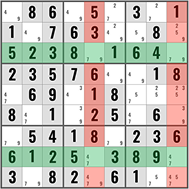
BUG (Bivalue Universal Grave) is an advanced Sudoku technique based on the uniqueness principle — the fact that every valid Sudoku puzzle has exactly one solution. A BUG state occurs when every unsolved cell in the grid has exactly two candidates. This would create a “deadly” situation with multiple solutions. Since the puzzle must have a unique solution, a BUG state cannot exist — and we can use this knowledge to resolve cells that would otherwise create one.
Prerequisites
Before learning BUG, you should be comfortable with:
- Candidate notation (pencil marks) — complete candidates in every cell
- Unique Rectangles — another uniqueness-based technique
- All intermediate techniques — BUG situations only arise late in the solving process
What is a BUG State?
A BUG state (Bivalue Universal Grave) occurs when every unsolved cell in the puzzle has exactly two candidates, AND every candidate digit appears exactly twice in every row, column, and box that it’s still unresolved in. In this state, there would be exactly two valid solutions — you could swap the candidates throughout the entire grid and both configurations would satisfy all constraints.
Since a proper Sudoku has one unique solution, a BUG state is impossible. This means any move that would create a BUG state must be wrong.
BUG+1: The Practical Application
In practice, you almost never see a pure BUG state. Instead, you encounter BUG+1: every unsolved cell has exactly two candidates except for one cell that has three candidates. This is the most useful application.
How BUG+1 Works
If reducing the three-candidate cell to any two of its candidates would create a BUG state, then the “extra” candidate — the one whose removal would create the BUG — must be the correct digit for that cell.
How to Identify the Extra Candidate
The extra candidate in the BUG+1 cell is the digit that appears three times in one of its houses (row, column, or box) instead of twice. In a BUG state, every digit appears exactly twice in every relevant house. The extra candidate is the one that breaks this even-count pattern.
How to Find BUG+1: Step-by-Step
Step 1: Check for Bivalue Cells
As you solve a puzzle, if you notice that nearly every unsolved cell has exactly two candidates, you might be approaching a BUG situation.
Step 2: Find the Exception
Look for exactly ONE cell with three candidates. If all other unsolved cells are bivalue, you have a BUG+1.
Step 3: Identify the Extra Candidate
For the three-candidate cell, check its row, column, and box. One of the three candidates will appear in three cells in one of those houses (instead of two). That candidate is the answer.
Step 4: Place the Digit
Set the BUG+1 cell to the extra candidate. This prevents the BUG state from forming and preserves the puzzle’s unique solution.
Worked Example
Late in solving a puzzle, the remaining unsolved cells are:
| Cell | Candidates |
|---|---|
| R1C3 | {2, 5} |
| R1C8 | {2, 5} |
| R3C3 | {4, 5} |
| R3C8 | {4, 5} |
| R7C3 | {2, 4} |
| R7C8 | {2, 4} |
| R9C3 | {2, 5} |
| R9C6 | {2, 4, 5} |
| R9C8 | {4, 5} |
Every cell has two candidates except R9C6 which has three: {2, 4, 5}.
Check R9C6’s houses for the extra candidate:
- Row 9: Candidate 2 appears in R9C3 and R9C6. Candidate 4 appears in R9C6 and R9C8. Candidate 5 appears in R9C3, R9C6, and R9C8.
Wait — let me check more carefully. Actually, in the BUG+1, we look for which candidate appears an odd number of times in a house:
- In Row 9: Among unsolved cells (R9C3, R9C6, R9C8), candidate 5 appears in R9C3 {2,5}, R9C6 {2,4,5}, and R9C8 {4,5} — that’s 3 times (odd).
- Candidates 2 and 4 each appear twice (even).
The extra candidate is 5. Therefore, R9C6 = 5.
Common Mistakes to Avoid
Not all other cells are bivalue. BUG+1 requires EVERY other unsolved cell to have exactly two candidates. If even one other cell has three or more, the analysis is more complex (BUG+2 or beyond, which is rarely practical).
Incorrect pencil marks invalidate the technique. Since BUG relies on the exact candidate counts, any missing or extra candidate breaks the analysis.
Confusing BUG with Unique Rectangles. Both use uniqueness, but Unique Rectangles target a specific 4-cell pattern, while BUG looks at the entire grid state.
Applying BUG too early. BUG conditions only arise near the end of a solve when most cells are resolved. Don’t look for it until you have a grid full of bivalue cells.
When to Use BUG
BUG is a late-game technique — it naturally appears (if at all) after extensive solving using all other techniques. You’ll know to check for it when you see the grid populated with bivalue cells.
BUG situations are rare — most puzzles don’t reach a state where BUG+1 applies. But when it does, it’s unmistakable and resolves instantly.
Frequently Asked Questions
How often does BUG+1 appear?
Rarely. Most puzzles are solved before a BUG state could form. When it does appear, it’s typically in Expert or Evil puzzles that have been reduced to a near-bivalue state by other advanced techniques.
Is BUG+1 the only form?
BUG+1 (one cell with three candidates) is the only practically useful form. BUG+2 and beyond exist theoretically but are too complex for human solvers and rarely appear.
Does BUG rely on the puzzle having one solution?
Yes, like Unique Rectangles, BUG leverages the uniqueness principle. It only works on puzzles guaranteed to have a single solution.
Can solving software use BUG?
Yes, and some solvers treat it as a standard technique. However, many advanced solvers prefer to use AICs or other techniques that don’t rely on uniqueness assumptions.
Practice BUG
For the best chance of encountering a BUG state, try our Evil difficulty puzzles.